

Payment history
See every transaction on your account, filter by type or category, search, and export to CSV.
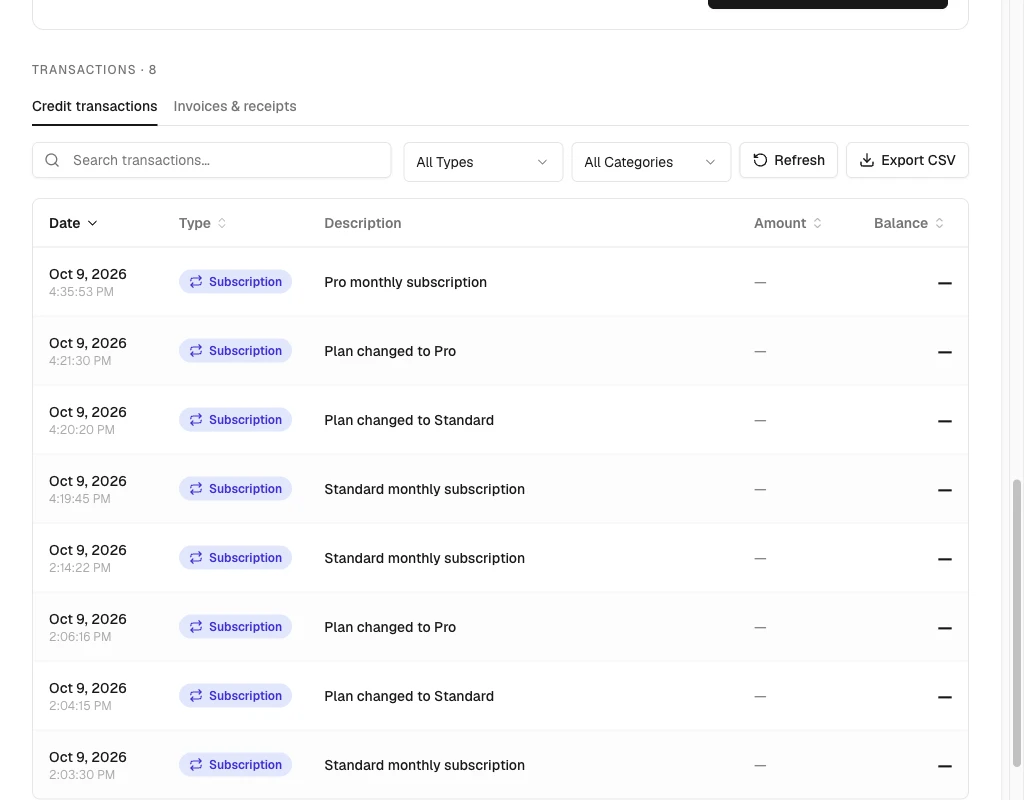
The Transactions section at the bottom of the wallet lists every credit transaction in this workspace. That includes purchases, transfers in and out, deductions, promo credits, and refunds.
In qBraid Default, two tabs sit under the section title: Credit transactions and Invoices & receipts. An organization workspace shows transactions only.
What each part does
- Search transactions. Filters the rows on the current page by description text.
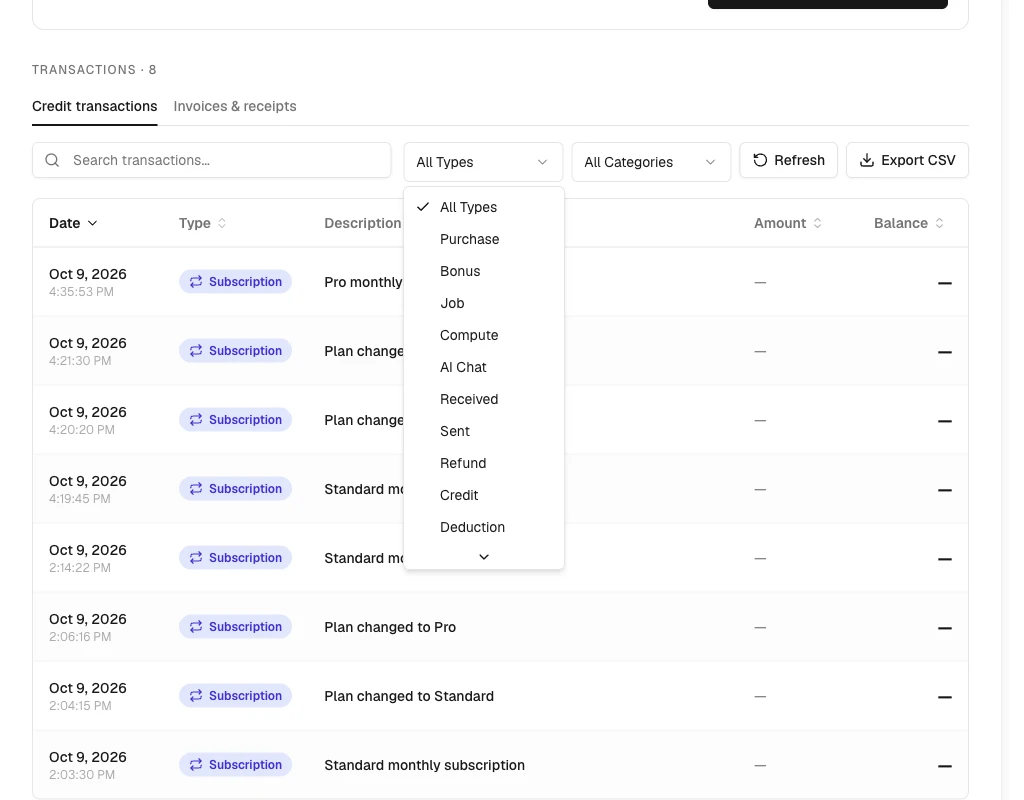
- All Types. Filters by transaction type, such as Purchase, Compute, AI Chat, Received, Sent, or Refund.
- All Categories. Filters by category: Purchases, Subscriptions, Transfers, Usage, or AI Chat.
- Refresh. Reloads the transactions without reloading the page.
- Export CSV. Downloads the current page of sorted and filtered rows.
- Old Transactions. Downloads legacy records. It appears only when your account has transactions from before the current billing system.
- Column headers. Date, Type, Amount, and Balance sort the page. Description does not sort.
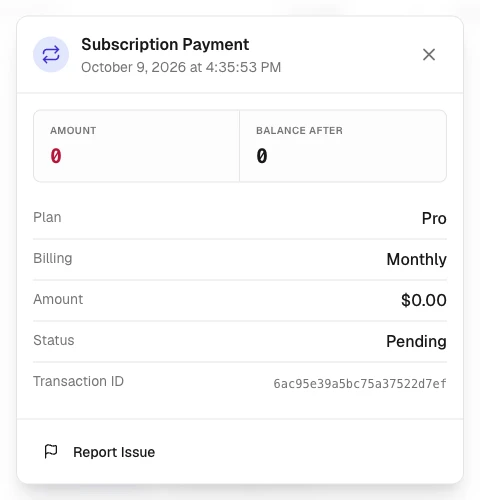
- Rows. Open a detail dialog with the amount, balance after, and per-type details.
Active filters appear as removable badges under the toolbar. A Clear all button clears them together.
There is no date-range filter today. Use search or the Type and Category dropdowns to narrow what you see.
Filter and search
- Type in Search transactions… to match descriptions on the current page.
- Open All Types and pick a type, such as Compute or Purchase.
- Open All Categories to narrow further to a business category.
- Remove a single filter from its badge, or select Clear all.
Read a row
Each row shows the date and time, a type badge, a description, the signed amount, and the balance after. A dash means the row carries no positive amount or no recorded balance.
Select a row to open its details. Depending on the transaction you can see:
- Payment details and a View Receipt link when available.
- The related user for transfers.
- The reason or note attached at the time.
- The transaction ID and a Report Issue link.
Grouped compute rows
Repeated charges for the same compute resource fold into a grouped row under the default date sort. The group shows the UTC day and the count, such as 8 charges · UTC day. Expand the group to inspect the individual billing periods.
Sorting by a value column such as Amount or Balance shows every row separately, so each transaction keeps its sorted position.
Pages
The table shows 20 rows per page. Use Previous and Next to move between pages. The footer shows the current range and the total count.
On narrow screens the table becomes a list of cards with the same information.
Export transactions
- Filter or sort the table as needed.
- Select Export CSV.
- The file
transactions-<YYYY-MM-DD>.csvdownloads with the current page of sorted and filtered rows. Columns: Date, Type, Category, Description, Amount, Balance.
The export contains one page of transactions. To download more, move through the table and export each page you need.
Legacy transactions
If you have transactions from before the current billing system, an Old Transactions button appears alongside the regular export. It downloads those older records in their original format.
Legacy and current transactions do not combine in the same file. Download both if you need a complete history.
Invoices
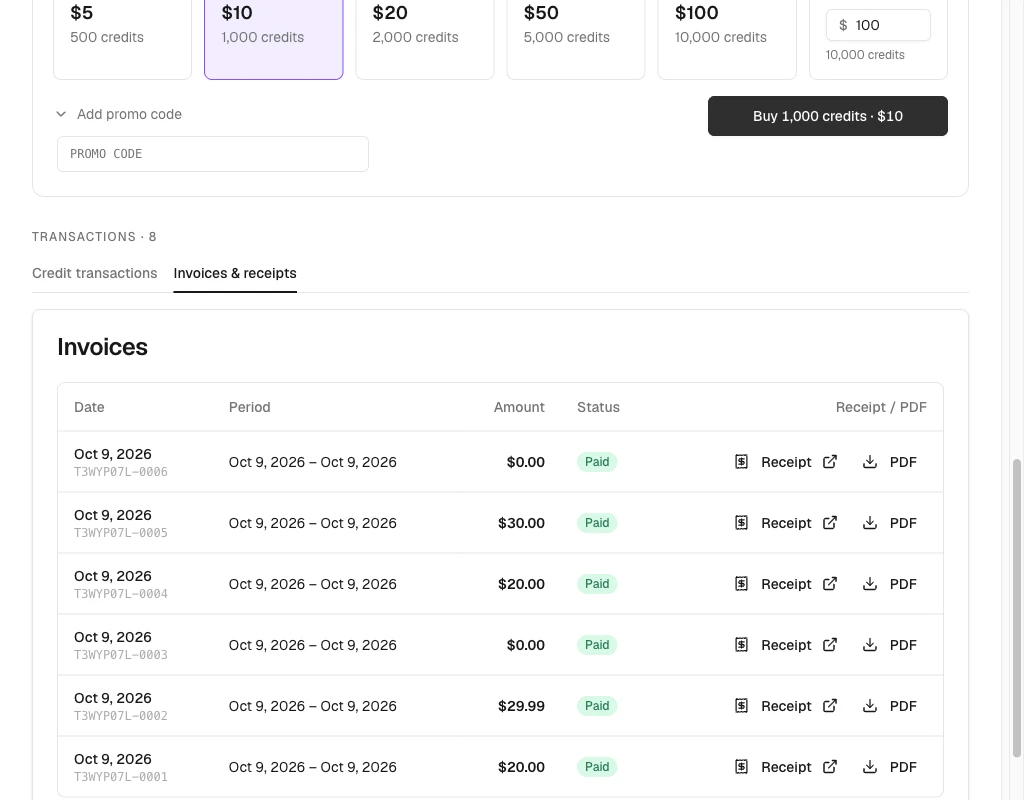
Open the Invoices & receipts tab in qBraid Default for your personal Stripe invoices. The table lists the date and invoice number, billing period, amount, and status. Select Receipt to open the hosted invoice or PDF to download it when those links are available.
Find invoices
- Open Account > Wallet in qBraid Default.
- Scroll to Transactions.
- Select the Invoices & receipts tab. On a narrow screen the tab reads Invoices.
- Select Receipt or PDF on the invoice’s row.
Invoices are different from credit transactions. A credit deduction does not necessarily have a Stripe invoice. For a team purchase, open Organizations > Billing > Invoices in the organization workspace.
Thanks for your feedback.