

Credit requests
Request organization credits, cancel a pending request, and approve or reject requests as an administrator.
Use Wallet in an organization workspace to request credits from the organization pool. Organization Owners and Admins review requests in Billing > Credit Requests. Managers and Members cannot approve or reject requests.
Approved credits go to your member wallet within the selected organization. Use that organization workspace when you spend them. They do not add to your personal qBraid Default balance.
Credit requests are available in organization workspaces. In qBraid Default, use Buy credits to fund your personal wallet.
Submit a request
Use these steps as a member.
Open the workspace switcher in the top-left of the dashboard. Select the organization that will fund your work.
Select Account > Wallet in the sidebar. Under Need more credits?, select Request credits.
The Request Credits from Organization dialog opens. Enter a whole number of credits from 1 to 10,000 in Amount.
Reason is optional. Leave it blank, or enter 10 to 500 characters that explain what you need the credits for. For example, name the project and the work you plan to run.
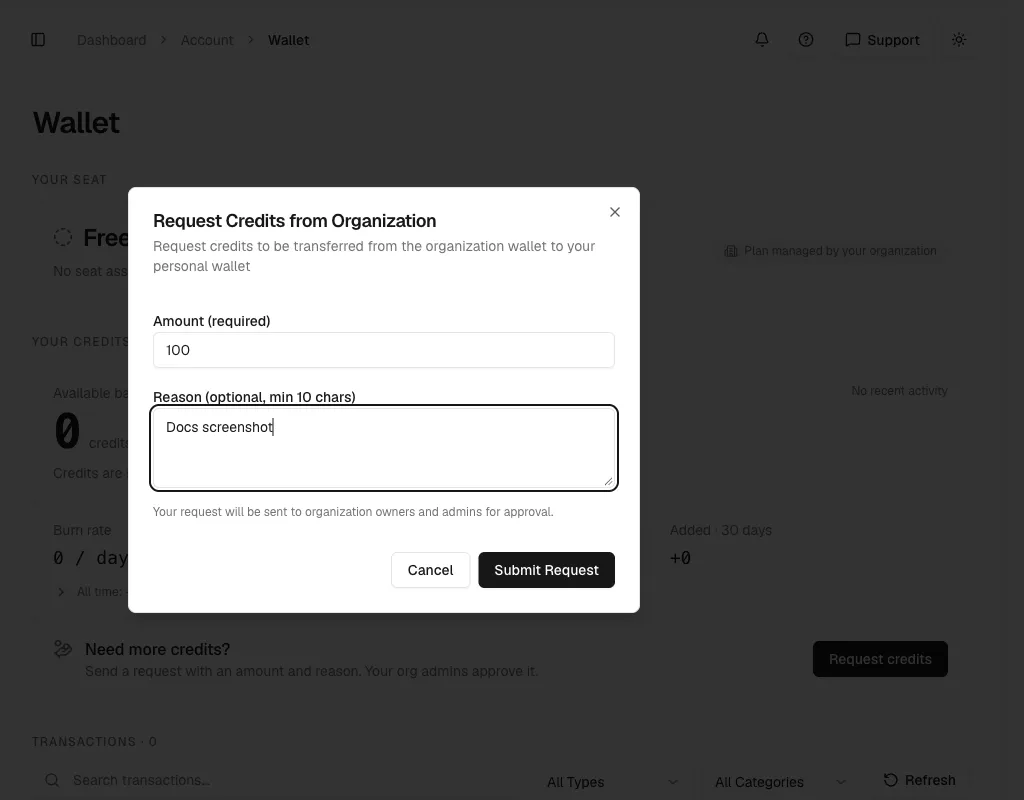
Select Submit Request. Select Cancel instead if you do not want to send it. The dialog tells you that the request goes to organization owners and admins for approval.
The Need more credits? panel changes to Request for N credits is pending. It shows the send date and your reason. Request credits turns off until an admin processes the request.
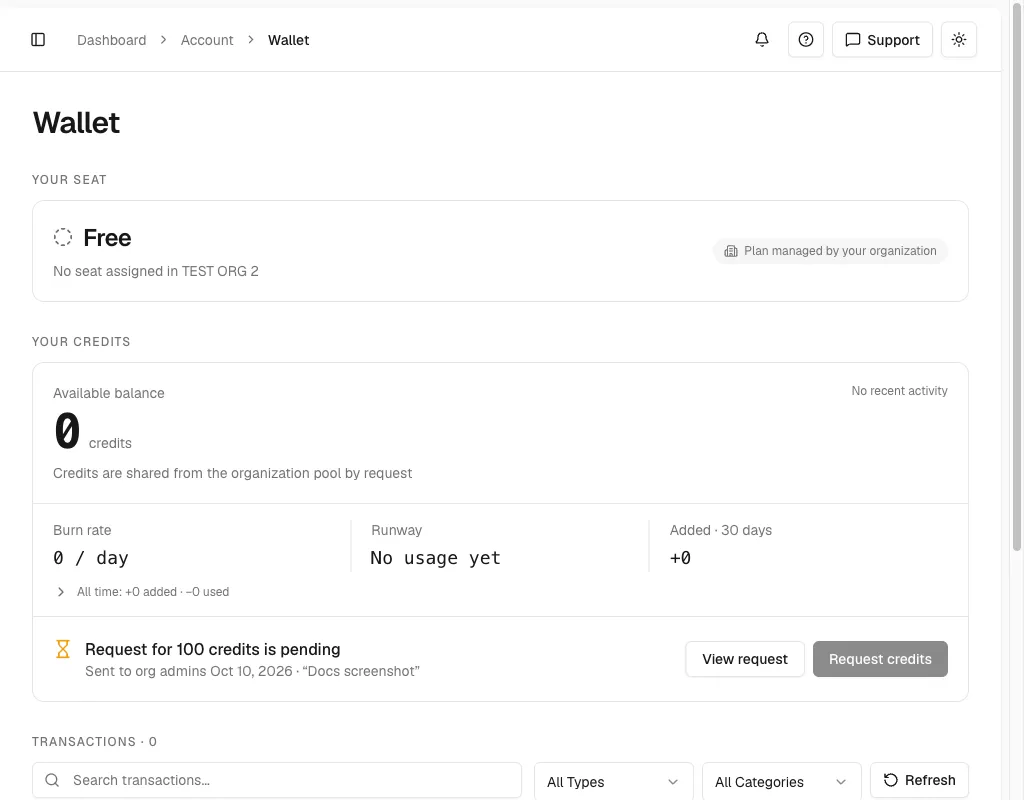
You can have one pending request at a time in each organization. Submitting a request does not transfer credits.
Track the request
- Select the same organization in the workspace switcher.
- Open Account > Wallet.
- Select View request.
- Review Amount, Reason, Status, and Requested in the Pending Credit Request dialog.
- Select Close to leave the request pending.
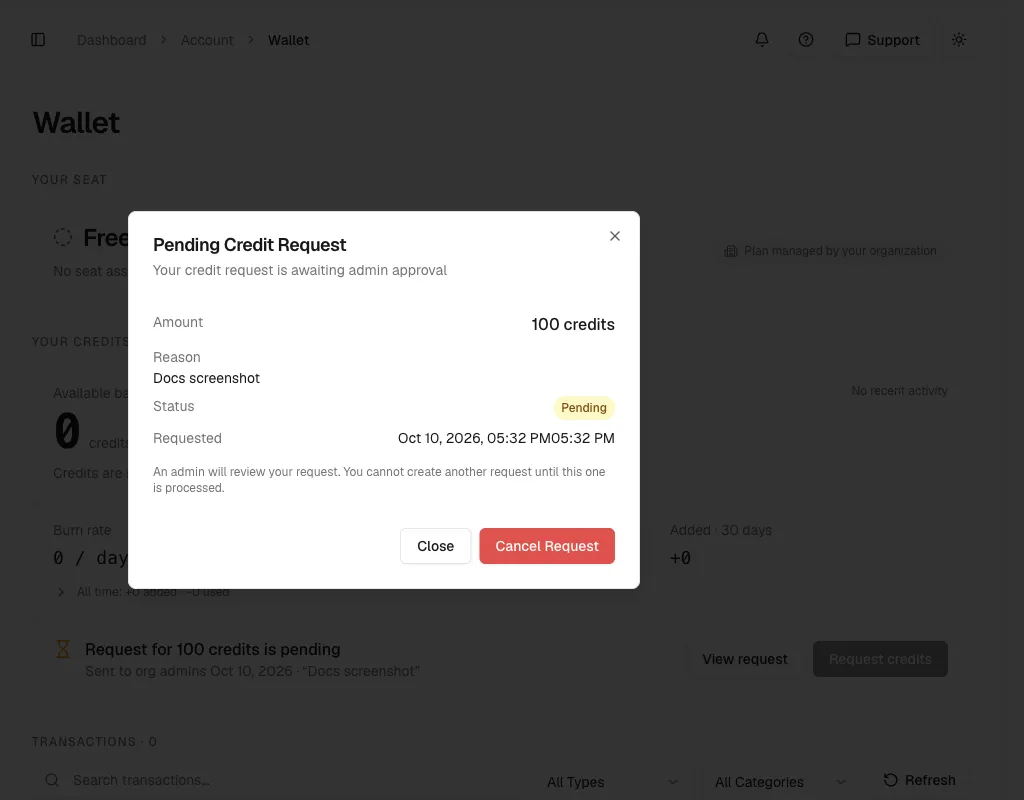
This dialog shows your pending request. It does not show completed requests or an administrator’s rejection reason. After an administrator approves or rejects it, check your Wallet balance in the organization, or ask an administrator about the decision.
Cancel or change a pending request
You can cancel your own pending request. To change its amount or reason, cancel it and submit a new request.
- Open Wallet > View request in the same organization.
- Select Cancel Request.
- Review the amount in Cancel Credit Request?.
- Select Cancel Request again to confirm, or Keep Request to leave it pending.
- After cancellation, use Request credits to submit a replacement if needed.
You cannot cancel a request after an administrator approves or rejects it. If an administrator acts on the request while the dialog is open, refresh the account data before you do anything else.
Review requests as an administrator
- Select the organization in the workspace switcher.
- Open Billing.
- Select Credit Requests.
- Find the member in Pending Requests.
- Read the amount and reason. Then select Approve or Reject.
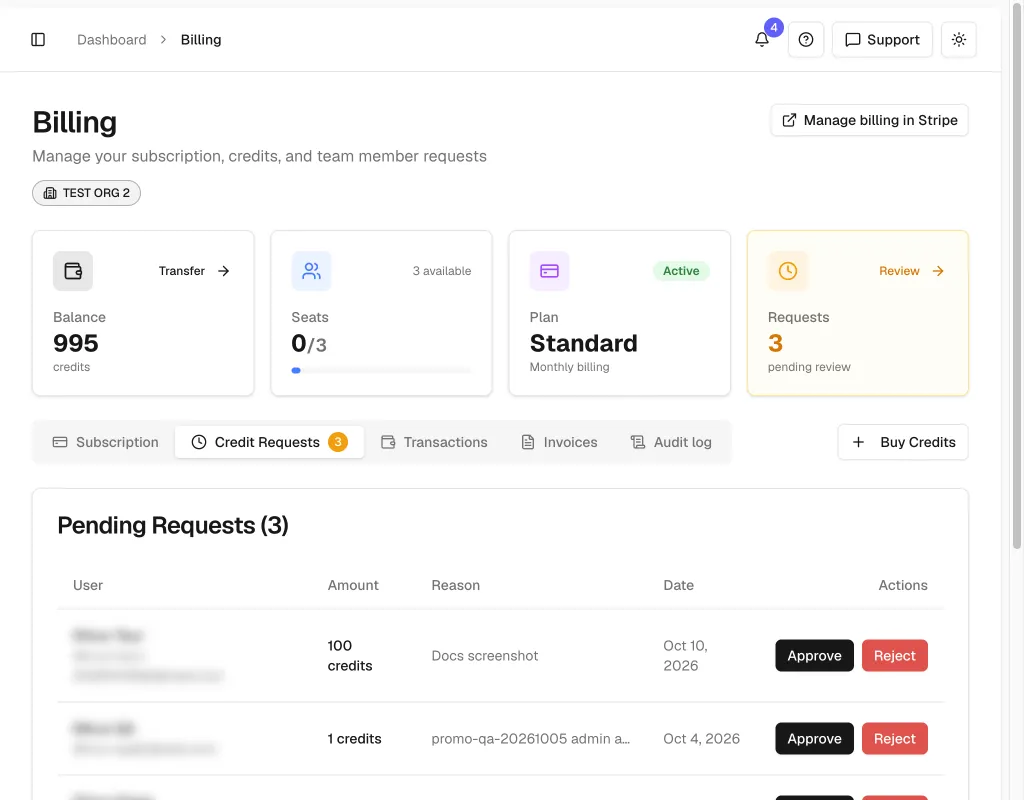
Each pending row shows the member’s name and email, requested amount, reason, request date, and Approve and Reject actions. The table can shorten long reasons. Open Approve to read the full reason before you decide, then select Cancel if you do not want to approve it.
Approve a credit request
Select Approve on the member’s request.
In Approve Credit Request, verify the member, reason, Amount to transfer, Current org balance, and New org balance.
Approval transfers the full requested amount. This dialog does not let you change the amount or add an approval note.
Select Approve Request and wait for the success message. Select Cancel instead to leave the request pending.
The request moves to Request History with status accepted. Check the organization balance and Transactions. The member sees the new balance in Wallet when they select the same organization.
If the pool cannot cover the request, the dialog shows Insufficient organization balance. Buy more credits first. and disables approval. Buy credits for the organization, then reopen the request after the balance updates.
If a different amount is appropriate, ask the member to cancel and submit a revised request. You can also reject the request with an explanation and make a direct transfer. Resolve the original request first so it does not remain available for another approval.
Reject a credit request
- In Pending Requests, select Reject on the member’s row.
- In Reject Credit Request, enter a Rejection Reason of 10 to 500 characters.
- Explain the decision and any next step, such as requesting a different amount.
- Select Reject Request and wait for confirmation. To leave the request pending, select Cancel instead.
The request moves to Request History with status rejected. Rejection does not transfer credits. The member can submit another request after the rejection. Share the decision with the member if they need the explanation, because Wallet does not display completed request details.
Check request history
The Request History table shows the member, amount, status, and original request date. accepted means an administrator approved the request. rejected means an administrator declined it. The date is the request date, not the decision date.
The tab shows up to 20 of the newest requests across pending requests and history, with only the latest request retained for each member. A replacement request can therefore remove an earlier decision from this view. Canceled requests do not appear in history.
Use Transactions to check credit movements and Audit logs to investigate recorded administrator actions. Request History is not a complete record of all past requests or proof that a queued transfer has finished.
Resolve a request problem
- If you already have a pending request, open View request. Cancel it before submitting a replacement.
- If the request fails to send, check the amount and the reason. The amount must be a whole number from 1 to 10,000. A reason, if you add one, must be 10 to 500 characters.
- If a request is no longer pending, another action may have processed or canceled it. Refresh account data, then check the request list.
- If approval fails or the balance has not updated, check the current request status and Transactions before retrying or making a separate transfer.
- If Credit Requests is unavailable, verify the selected organization and your Owner or Admin role.
For an urgent request, contact an organization administrator. Administrators can transfer credits directly without requiring a request.
Thanks for your feedback.