
Overview
Fire Opal is a software package that makes it simple for anyone to achieve meaningful results from quantum computers. Using AI-driven error suppression, Fire Opal improves the success of algorithms by thousands of times and enables you to successfully scale to large problem sizes, without even having to worry about the details of quantum circuits. At the same time, reaching the correct answer takes fewer shots and requires no overhead, meaning that you save on compute cost. For an in-depth explanation of Fire Opal’s benefits and capabilities, check out the Fire Opal overview. This tutorial will run through the steps to set up Fire Opal on the qBraid Lab platform and use it to run a Bernstein-Vazirani circuit. After completion, you will have demonstrated Fire Opal’s benefits by comparing the success probabilities of executing the circuit with both Fire Opal and Qiskit. Click below to clone the qbraid-lab-demo repository into your qBraid Lab and follow along with the code examples in this tutorial. The original companion notebook,get-started.ipynb, is preserved on GitHub.

Setup
1. Sign up for Q-CTRL account
You will need to sign up for a Q-CTRL account to run the Fire Opal package.2. Install the Fire Opal Environment in qBraid Lab
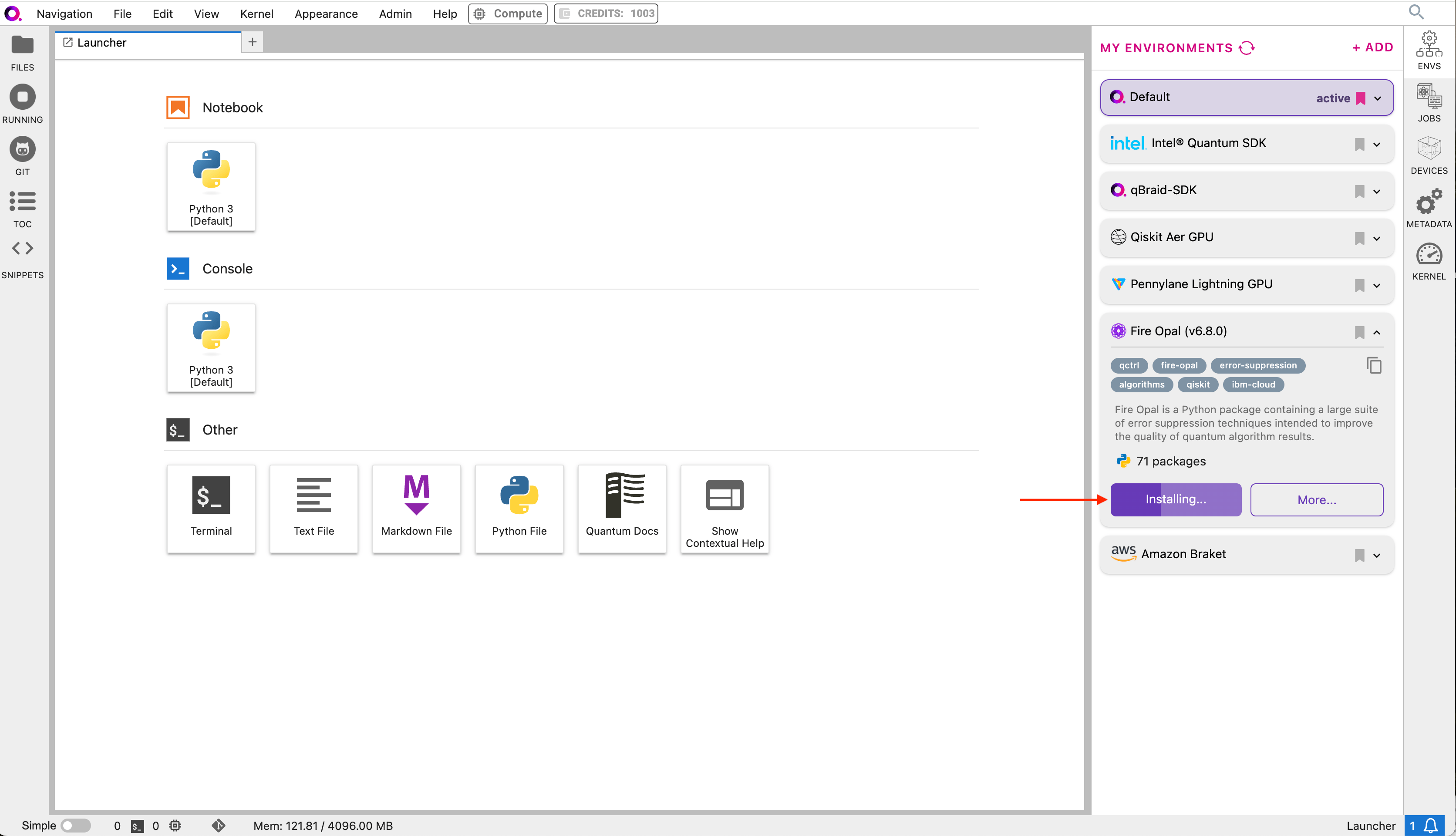
2a. In the Environment Manager sidebar, click Add to view the environments available to install. 2b. Choose the Fire Opal environment, expand its panel, and click Install.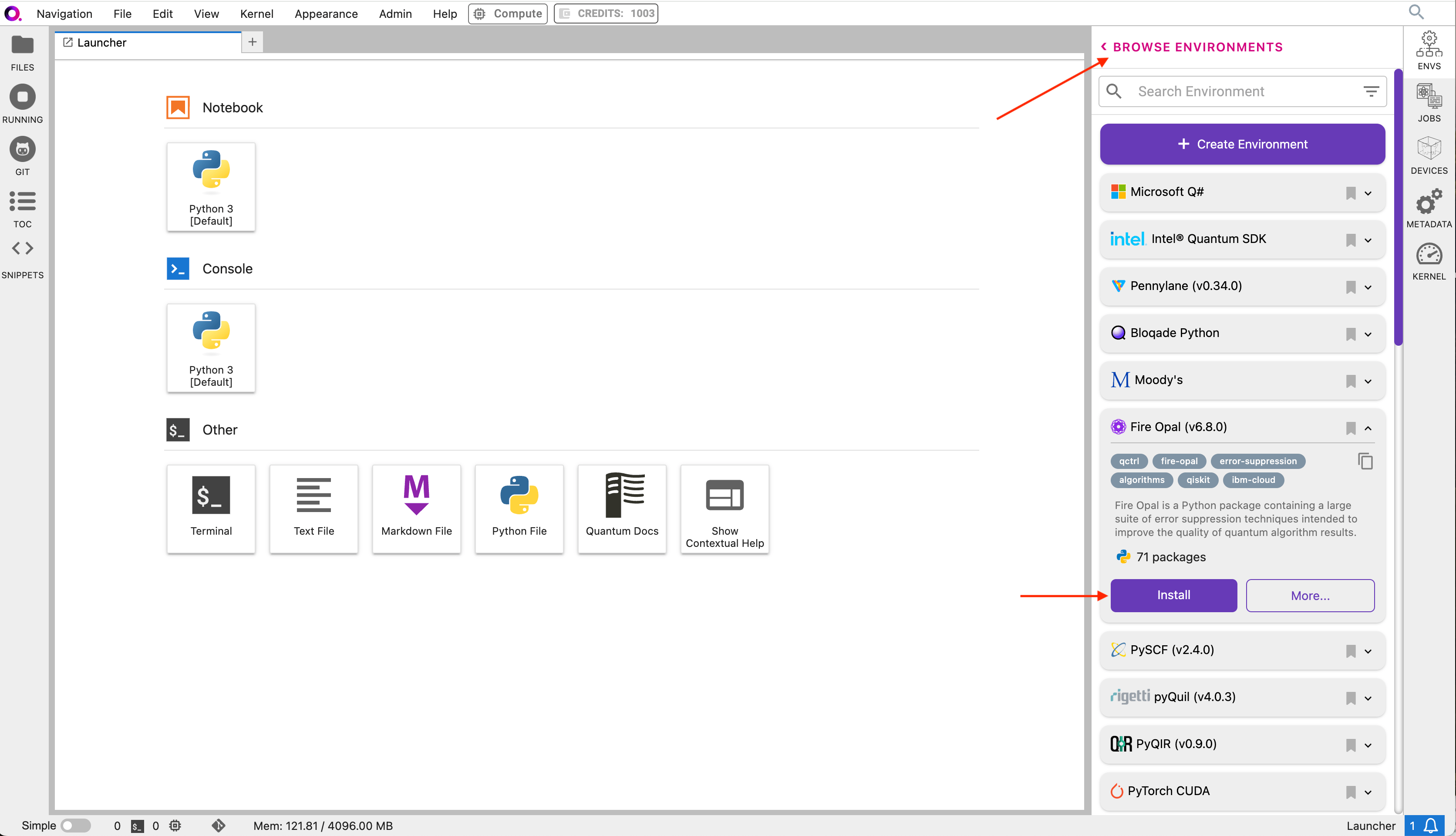
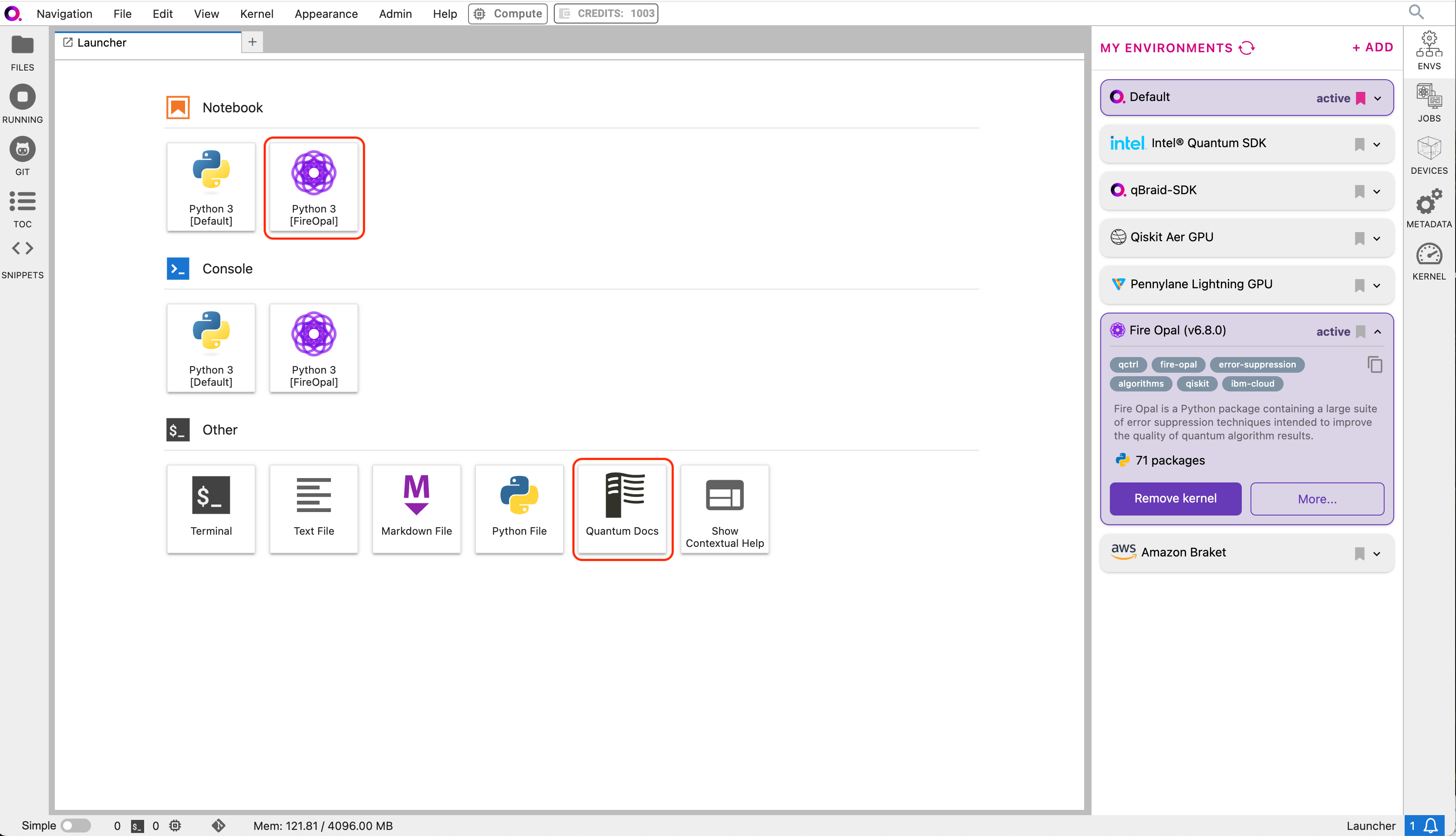
Python 3 [FireOpal]
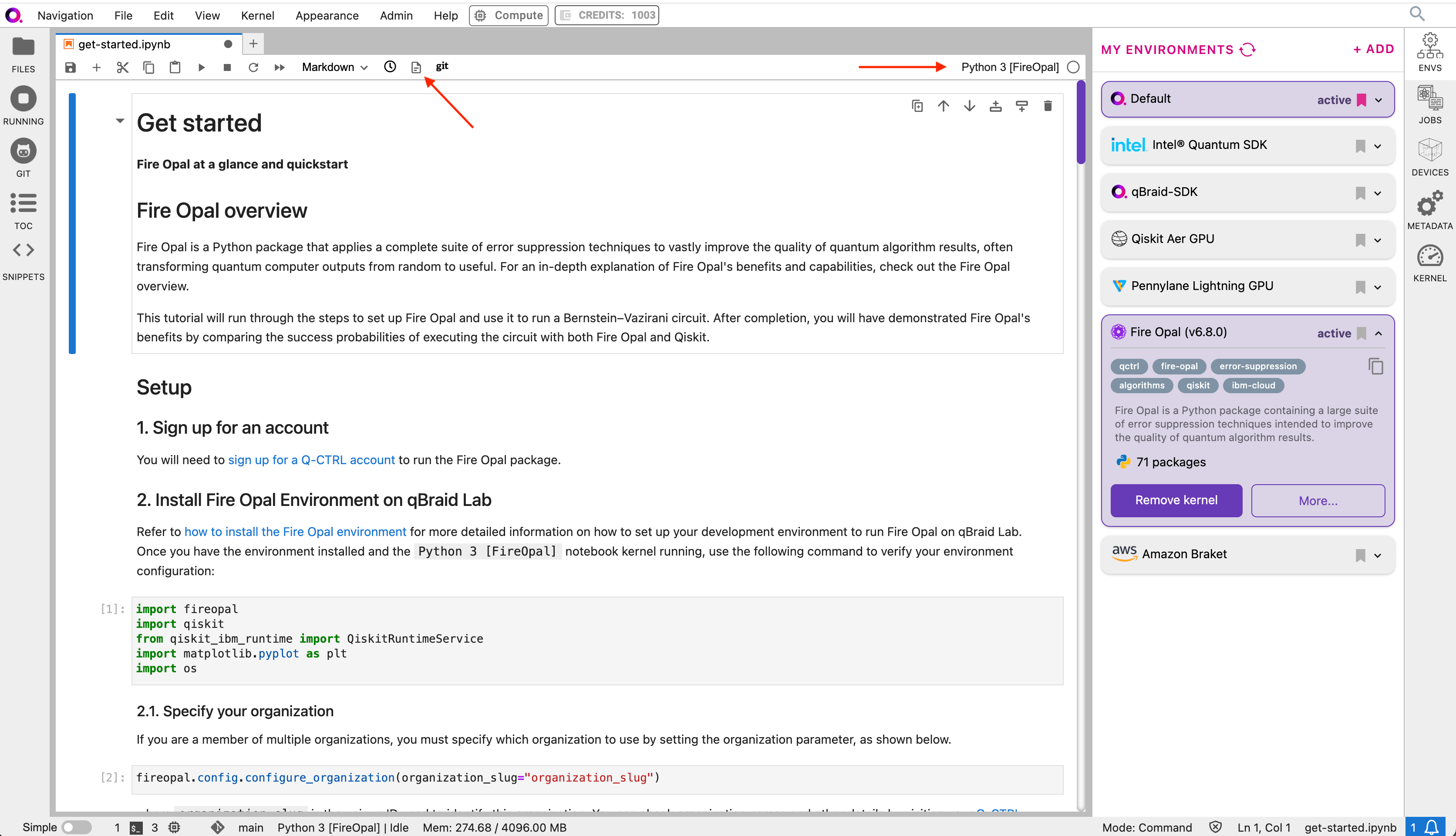
(see switch notebook kernel). Then, verify that the Fire Opal environment
is configured correctly by running the following code in the first cell:
3. Specify your Q-CTRL organization
If you are a member of multiple organizations, you must specify which organization to use by setting the organization parameter, as shown below.organization_slug is the unique ID used to identify this organization. You can check organization names and other
details by visiting your Q-CTRL account.
4. Sign up for an IBM Cloud account
While Fire Opal’s technology is inherently backend agnostic, in this tutorial we will run the circuit on an IBM Quantum backend device. You will need to sign up for an IBM Quantum account, which you can use to access devices on the Open or Premium IBM Quantum plans. Simply input your hub, group, project, and access token to the make_credentials_for_ibm_cloud function.IBM Quantum offers public access to some of their quantum computers. However,
queue times for public systems can be long, which will cause delays in the
execution steps of this guide (demo steps 5 and 7). These delays are
extraneous to Fire Opal.
Demo: Running the Bernstein-Vazirani algorithm with Fire Opal
We’ll use Fire Opal to run a Bernstein-Vazirani circuit. This algorithm is broadly used to find a string from the outputs of a black box function, though this information is not necessary for the sake of running this example.1. Define helper functions
draw_circuit: draws our QASM circuitplot_bv_results: plots the results of our experiments
2. Provider the quantum circuit
Here, we will define the Bernstein-Vazirani circuit as an OpenQASM string and visualize it using our previously defined helper functiondraw_circuit. Such a string can also be generated by exporting a quantum circuit written
with any quantum-specific Python library.
3. Provide your device information and credentials
Next, we’ll provide device information for the real hardware backend. Fire Opal will execute the circuit on the backend on your behalf, and it is designed to work seamlessly across multiple backend providers. For this example, we will use an IBM Quantum hardware device. Note that the code below requires your IBM Quantum API token. Visit IBM Quantum to sign up for an account and obtain your access credentials.show_supported_devices to list the devices that are both supported by Fire Opal and accessible
to you when using the credentials above.
"desired_backend". The list will only include devices
accessible to you.
4. Validate the circuit and backend
Now that we have defined our credentials and are able to select a device we wish to use, we can validate that Fire Opal can compile our circuit, and that it’s compatible with the indicated backend.validate_results["results"] == []. Note that the length of the validate_results list is the total number of errors present
across all circuits in a batch. Since our circuit is error free, we can execute our circuit on real hardware.
5. Execute the circuit using Fire Opal
In the absence of hardware noise, only a single experiment would be required to obtain the correct hidden string:111 111 111 11.
However in real quantum hardware, noise disturbs the state of the system and degrades performance, decreasing the probability of
obtaining the correct answer for any single experiment. Fire Opal automates the adjustments made by experts when running circuits
on a real device.
Once jobs are submitted, there may be a delay in returning results due to the
hardware provider’s queue. You can view and retrieve results
later.
Be sure to let your jobs finish executing, and do not cancel the process. Even
in the case of kernel disconnection, the job will still complete, and results
can later be retrieved.
6. Analyze Results
Now you can look at the outputs from the quantum circuit executions. The success probability is simply the number of times the hidden string was obtained out of the total number of circuit shots. For reference, running this circuit on a real device without Fire Opal typically has a success probability of 2-3%. As you can see, Fire Opal greatly improved the success probability.
7. Compare Fire Opal Results with Qiskit
To get a true comparison, let’s run the same circuit without Fire Opal. We’ll run the circuit using Qiskit on the same IBM backend as used previously to get a one-to-one comparison.
111 111 111 11 state.
We should also take note of the amount of incorrect states that now contain non-zero return probabilities. Not only do default
configurations fail to find the correct answer, they also increase the probabilities of the incorrect answers.
In fact, the performance degradation is so severe that in order to be reasonably sure of the hidden string, using the original
classical algorithm would be more efficient.
You can tell that Fire Opal found the correct answer because the mode of the output distribution, or the most frequent outcome,
matches the desired output: bitstring 111 111 111 11. Fire Opal significantly improves the probability of a successful outcome,
often by a factor of ten or more.