The qBraid Lab GPU server is tailored for researchers and developers requiring enhanced computational capabilities. This high-performance Lab instance allows users to leverage GPUs for accelerated circuit simulation, to explore quantum machine learning applications with GPU-enabled quantum gradients, and more.
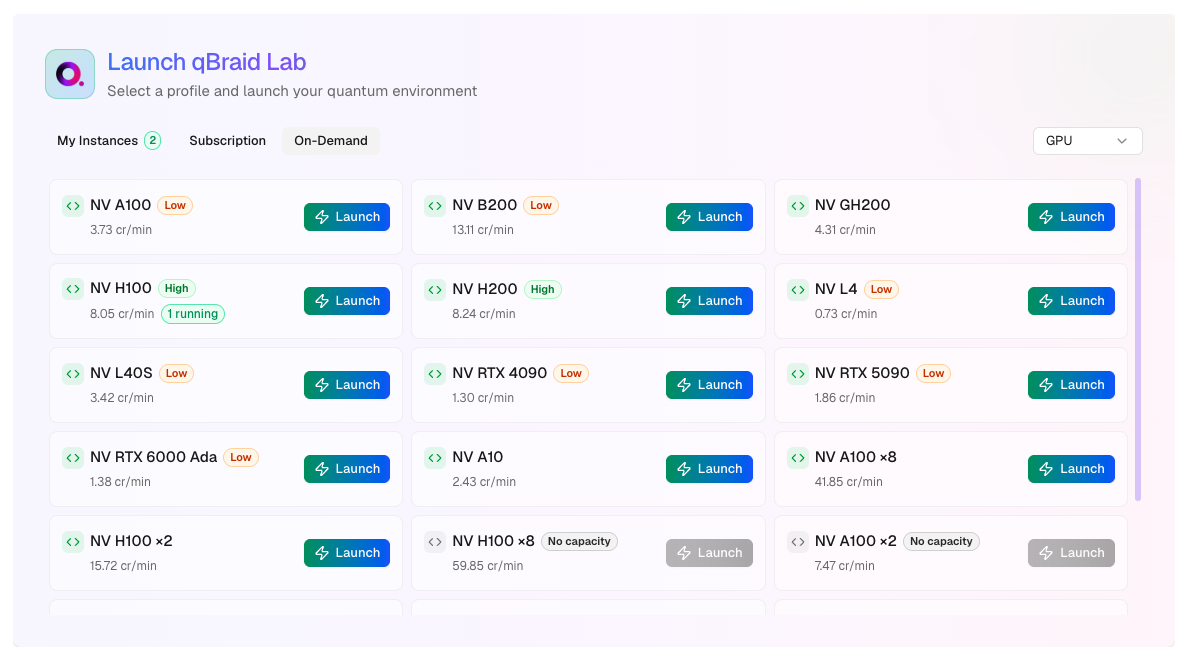
  • Wide GPU access: V100, A100, H100, GH200, and B200 class GPUs, available in various configurations. Billing is in credits/minute with rates shown in your account launcher.
  • Pre-configured Python environment: Activate the default environment by running qbraid envs activate default in a terminal or simply open a notebook and make sure the default kernel is selected. This environment includes GPU-optimized versions of qiskit / qiskit-aer, cudaq, pennylane / pennylane-lightning, PyTorch, TensorFlow, and JAX.

Launch GPU instance

Use the drop-down at the top of your account page to select the GPU Lab image, and then click Launch New Instance.
gpu_image
You will first see a “Starting GPU Server” panel while your server is being prepared - Once the GPU instance is ready, the status will change to “Running”. Click Open Running Server to access your GPU instance -
The GPU servers may take up to 15 minutes to launch compared to standard Lab instances, as the GPU resources are provisioned on-demand.

Available GPU Configurations

qBraid offers a variety of GPU configurations to meet different computational needs:
Instance NameGPU TypeRAM ConfigurationCredits/Min
1xA100-40GB-SXM41x NVIDIA A100 40GB SXM440GB VRAM2.15
1xH100-80GB-PCIE1x NVIDIA H100 80GB PCIe80GB VRAM4.15
2xH100-80GB-SXM52x NVIDIA H100 80GB SXM580GB VRAM each10.63
4xH100-80GB-SXM54x NVIDIA H100 80GB SXM580GB VRAM each20.60
8xV100-16GB8x NVIDIA V100 16GB16GB VRAM each7.33
8xA100-40GB-SXM48x NVIDIA A100 40GB SXM440GB VRAM each17.20
8xA100-80GB-SXM48x NVIDIA A100 80GB SXM480GB VRAM each23.87
8xH100-80GB-SXM58x NVIDIA H100 80GB SXM580GB VRAM each39.87
Further information can be retrieved using the NVIDIA System Management Interface (nvidia-smi) and NVIDIA CUDA Toolkit (nvcc) command line utilities.
Additional GPU configurations are available. Visit your account page to see the full list of options.

GPU-enabled environments

The GPU Lab image comes pre-configured with the NVIDIA cuQuantum SDK GPU simulator library, and includes GPU integrations with other popular quantum softwares packages such as Pennylane-Lightning, Qiskit Aer, and Qsim-Cirq.

Pennylane-Lightning

PennyLane is a cross-platform Python library for quantum machine learning, automatic differentiation, and optimization of hybrid quantum-classical computations. The PennyLane-Lightning-GPU plugin extends the Pennylane-Lightning state-vector simulator written in C++, and offloads to the NVIDIA cuQuantum SDK for GPU accelerated circuit simulation. The lightning.gpu device is an extension of PennyLane’s built-in lightning.qubit device. It extends the CPU-focused Lightning simulator to run using the NVIDIA cuQuantum SDK, enabling GPU-accelerated simulation of quantum state-vector evolution. A lightning.gpu device can be loaded using:
import pennylane as qml

dev = qml.device("lightning.qubit", wires=2)
The above device will allow all operations to be performed on the pre-configured CUDA capable GPU. If not used inside the qBraid GPU instance, or if the cuQuantum libraries are not installed in the given environment, the device will fall-back to lightning.qubit and perform all simulation on the CPU.

Qiskit Aer

Qiskit is an open-source framework for working with noisy quantum computers at the level of pulses, circuits, and algorithms. The Qiskit Aer library provides high-performance quantum computing simulators with realistic noise models. On qBraid, the Qiskit Aer GPU environment comes with the qiskit-aer-gpu package, extending the same functionality of the canonical qiskit-aer package, plus the ability to run the GPU supported simulators: statevector, density matrix, and unitary. Here is a basic example:
import qiskit
from qiskit_aer import AerSimulator

# Generate 3-qubit GHZ state
circ = qiskit.QuantumCircuit(3)
circ.h(0)
circ.cx(0, 1)
circ.cx(1, 2)
circ.measure_all()

# Construct an ideal simulator
aersim = AerSimulator(method='statevector', device='GPU')

# Perform an ideal simulation
result_ideal = qiskit.execute(circ, aersim).result()
counts_ideal = result_ideal.get_counts(0)
print('Counts(ideal):', counts_ideal)
# Counts(ideal): {'000': 493, '111': 531}

What’s Next

We’re actively expanding GPU capabilities on qBraid. Here’s what to expect:
Expanding environment support: You can create and persist local environments in GPU sessions. Shareable environments and pre-packaged environments from standard qBraid are on the roadmap.Growing capacity: We’re continuously adding more GPU resources to meet demand. If capacity is temporarily unavailable, check back periodically as capacity becomes available.Improving startup reliability: If you encounter any NVIDIA setup issues after starting a GPU, run nvidia-smi in a terminal session. If you see an error, simply restart the same instance.