> ## Documentation Index
> Fetch the complete documentation index at: https://docs.qbraid.com/llms.txt
> Use this file to discover all available pages before exploring further.
# qBraid VS Code
> Directly connect to an online VS Code environment with pre-installed quantum extensions.
## Overview
qBraid VS Code is a cloud-hosted deployment of Visual Studio Code, designed for quantum computing and available to all qBraid users. It offers a browser-based coding environment with direct access to quantum resources, pre-configured environments, and seamless integration with qBraid Lab. Users can develop, run, and manage quantum and classical code from anywhere, without the need for local setup or installation.
## How to Launch
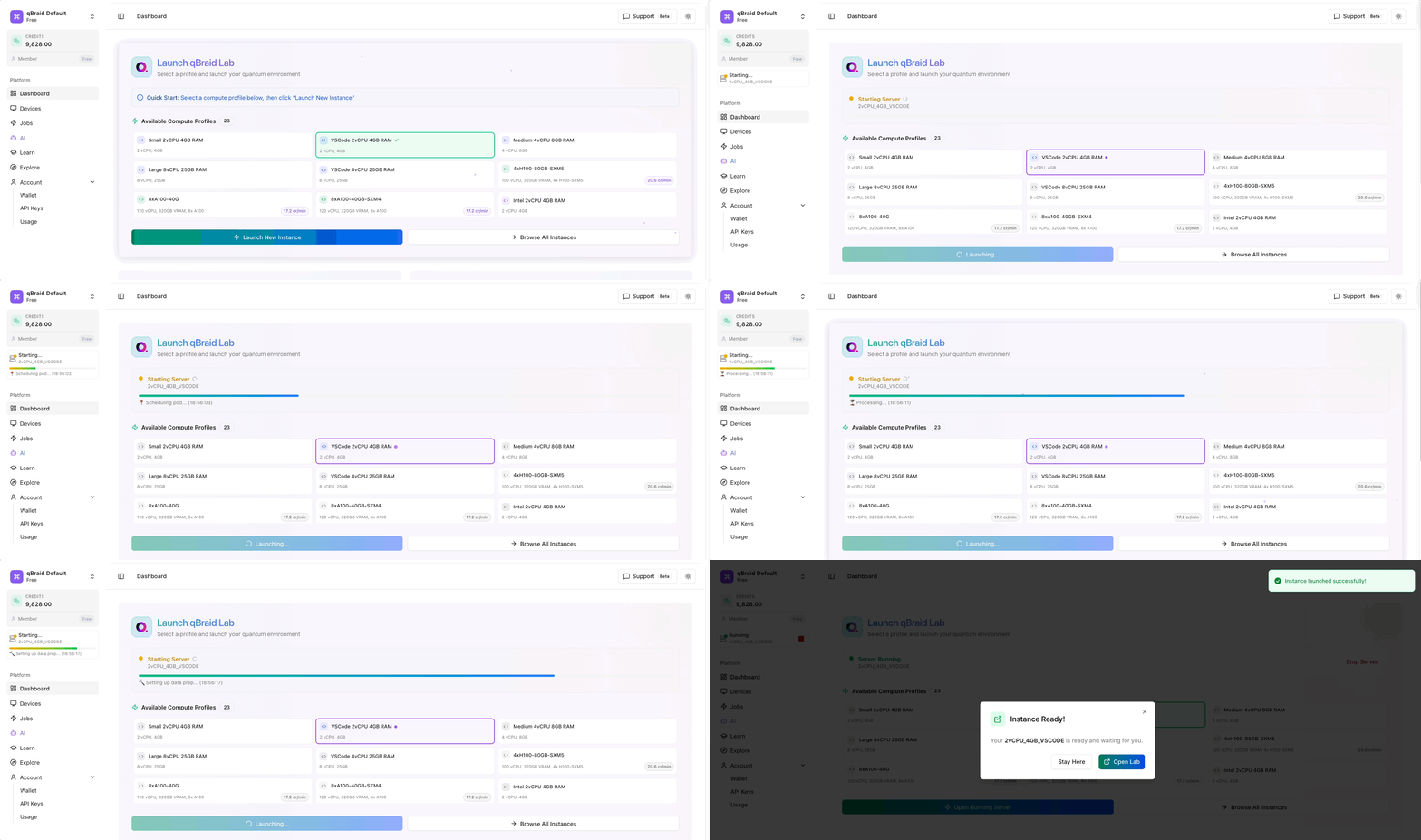 1. **Login to qBraid:**\
Go to [qbraid.com](https://qbraid.com) and sign in with your account.
2. **Choose VS Code Instance:**\
Navigate to the Dashboard section and select the VS Code option from your available compute environments. You will have an option to choose instances with varying resource allocations based on your needs.
3. **Launch:**\
Click the "Launch New Instance" button to start your cloud VS Code session. The editor will open in your browser, ready to use with all quantum tools pre-installed.
## Features
1. **Login to qBraid:**\
Go to [qbraid.com](https://qbraid.com) and sign in with your account.
2. **Choose VS Code Instance:**\
Navigate to the Dashboard section and select the VS Code option from your available compute environments. You will have an option to choose instances with varying resource allocations based on your needs.
3. **Launch:**\
Click the "Launch New Instance" button to start your cloud VS Code session. The editor will open in your browser, ready to use with all quantum tools pre-installed.
## Features
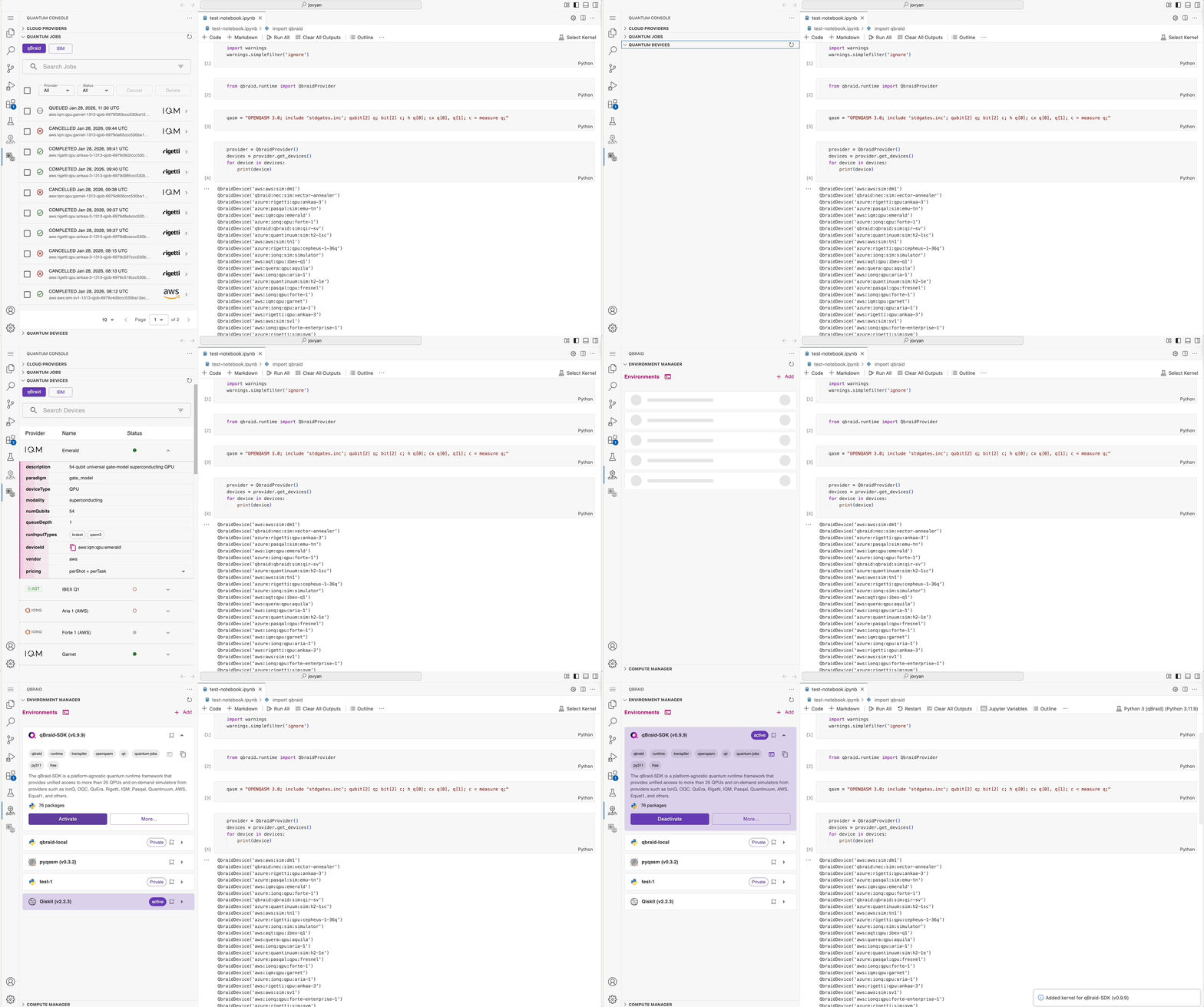 * **Quantum Console:**\
Manage quantum jobs, devices, and providers (including IBM and qBraid) directly from the VS Code interface.
* **Environment Manager:**\
Create, activate, and manage Python environments for quantum development, both locally and in the cloud.
* **Pre-configured Quantum Lab:**\
Access Jupyter notebooks, quantum SDKs, and all necessary dependencies without manual setup.
* **Seamless Integration:**\
Move between code, notebooks, and quantum resources with a unified experience, leveraging qBraid’s authentication and resource management.
qBraid VS Code streamlines quantum development, making it easy to start coding, experimenting, and running jobs on real quantum hardware — all
within the same environment.
* **Quantum Console:**\
Manage quantum jobs, devices, and providers (including IBM and qBraid) directly from the VS Code interface.
* **Environment Manager:**\
Create, activate, and manage Python environments for quantum development, both locally and in the cloud.
* **Pre-configured Quantum Lab:**\
Access Jupyter notebooks, quantum SDKs, and all necessary dependencies without manual setup.
* **Seamless Integration:**\
Move between code, notebooks, and quantum resources with a unified experience, leveraging qBraid’s authentication and resource management.
qBraid VS Code streamlines quantum development, making it easy to start coding, experimenting, and running jobs on real quantum hardware — all
within the same environment.