> ## Documentation Index
> Fetch the complete documentation index at: https://docs.qbraid.com/llms.txt
> Use this file to discover all available pages before exploring further.
# Usage Quotas
> Understanding AI usage limits and credit consumption on qBraid
qBraid provides a default monthly quota for AI chats, powered by qBraid credits. This guide explains how your AI quota works and how to track your usage.
## Plan Quotas
Your monthly AI quota depends on your subscription plan:
| Plan | Default AI Usage |
| ------------ | ---------------- |
| **Free** | Base quota |
| **Standard** | 5x more usage |
| **Pro** | 10x more usage |
Complex queries with longer responses consume more input / output tokens and
will fill up your quota faster.
## Usage Costs
Each AI interaction consumes a portion of your monthly quota based on the type of action:
| Action | Average Cost |
| -------------------- | ------------ |
| AI Chat prompt | 1 credit |
| Agent Mode query | 2 credits |
| Agent Mode execution | 5 credits |
Credit costs only come into play once your monthly quota is exhausted **and**
you have enabled the **Auto-switch to Credits** toggle. Until then, all AI
usage is covered by your plan's included quota.
## Tracking Your Usage
Monitor your AI usage in real-time from your account dashboard:
1. Navigate to your [account dashboard](https://account.qbraid.com/)
2. Go to **Account > Usage > AI Chat Usage**
3. View your current consumption and remaining quota
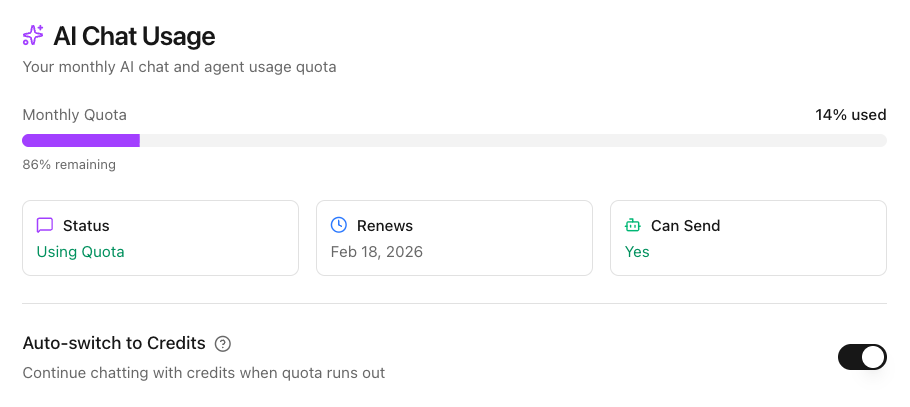
The usage panel displays:
* **Monthly Quota** — Progress bar showing percentage of your monthly AI quota used
* **Status** — Whether you're currently using your quota or credits
* **Renews** — The date when your monthly quota resets
* **Can Send** — Whether you can currently send AI agent messages
* **Auto-switch to Credits** — Toggle to continue chatting with credits when your quota runs out
## Tips for Efficient Usage
Ask multiple related questions in a single prompt rather than separate messages to reduce credit consumption.
{" "}
Save Agent Mode for execution tasks. Use regular AI Chat for exploration and
learning.
The AI remembers your conversation, so you don't need to repeat context in follow-up questions.
## Upgrading Your Plan
Need more AI usage? Visit your [subscription settings](https://account.qbraid.com/account/wallet) to upgrade your plan, or [contact us](mailto:contact@qbraid.com) for enterprise plans with custom AI allocations.
***
For complete details on all qBraid usage limits including compute hours and
disk storage, see [Usage Limits](/v2/lab/user-guide/usage-limits).