> ## Documentation Index
> Fetch the complete documentation index at: https://docs.qbraid.com/llms.txt
> Use this file to discover all available pages before exploring further.

# AI Chat

> Your intelligent assistant for all things qBraid and quantum computing

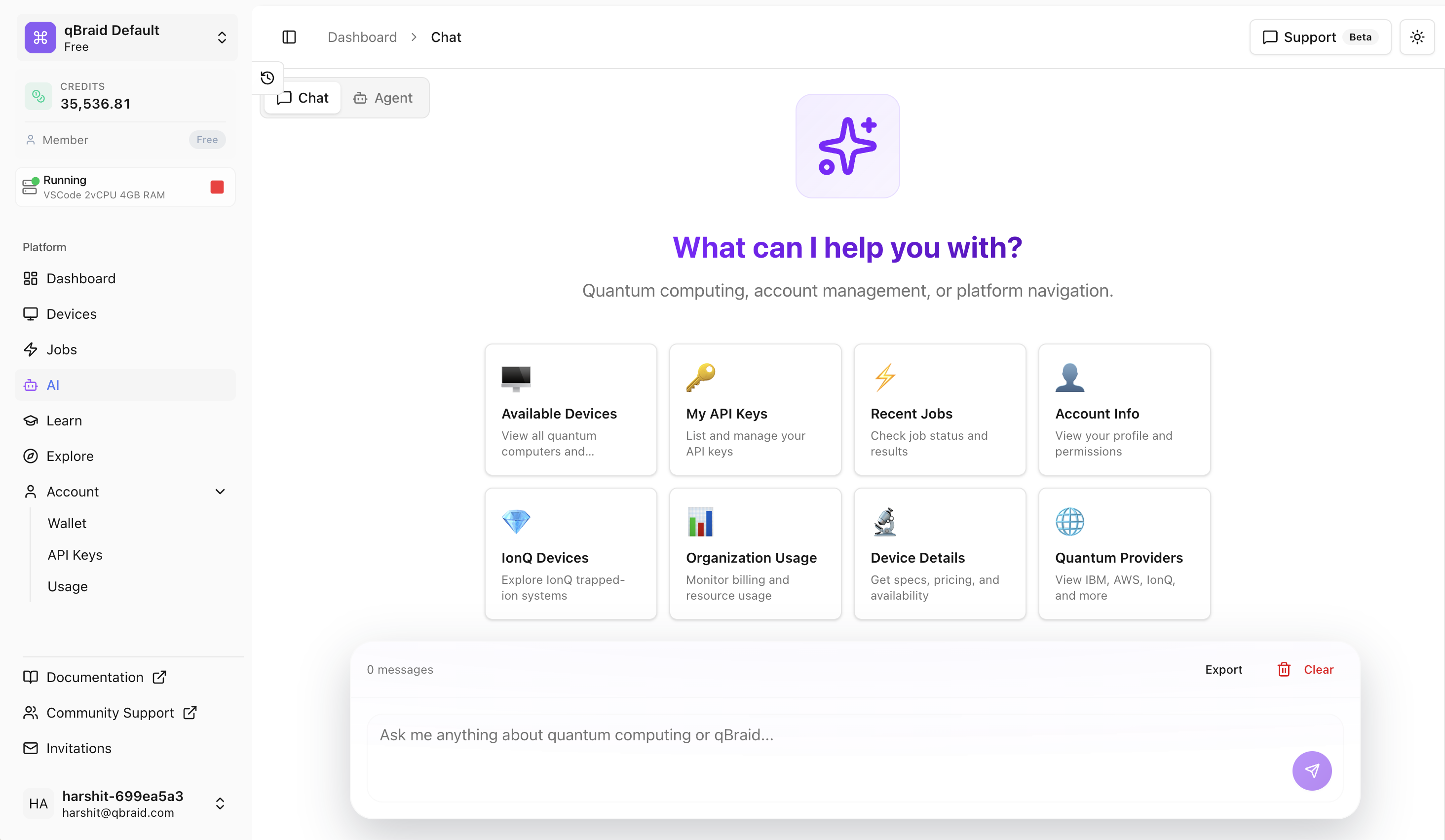
qBraid AI Chat is the most capable AI assistant for quantum computing on the qBraid platform. Whether you're exploring quantum devices, tracking your jobs, or planning your learning journey, the AI Chat provides intelligent, context-aware responses powered by our in-house MCP server.

<div style={{ display: "flex", justifyContent: "center", alignItems: "center" }}>
  <img src="https://storage.googleapis.com/qbraid-static-assets/qbraid-docs/ai/ai-chat-intro.png" alt="AI Chat Interface" width="90%" />
</div>

## How It Works

The AI Chat is powered by qBraid's [Model Context Protocol (MCP)](https://modelcontextprotocol.io/docs/getting-started/intro) server, which provides the underlying language model with crucial real-time context about:

* Live quantum device statuses and specifications
* Your quantum job history and results
* qBraid platform capabilities and documentation
* Quantum computing concepts and best practices

This means you get accurate, up-to-date answers rather than responses based on potentially outdated training data.

## Accessing AI Chat

1. Login to [account.qbraid.com](https://account.qbraid.com/)
2. Click the **AI Chat** icon in the left sidebar
3. Type your question and press Enter

<div style={{ display: "flex", justifyContent: "center", alignItems: "center" }}>
  {/* <img
      src="https://storage.googleapis.com/qbraid-static-assets/qbraid-docs/ai/open-ai-chat.gif"
      alt="Opening AI Chat"
      width="80%"
    /> */}
</div>

## Example Use Cases

Explore what you can accomplish with AI Chat through these example prompts:

<Tabs>
  <Tab title="Quantum Devices">
    ### Exploring Quantum Devices

    Ask the AI about available quantum devices, their specifications, and current status.

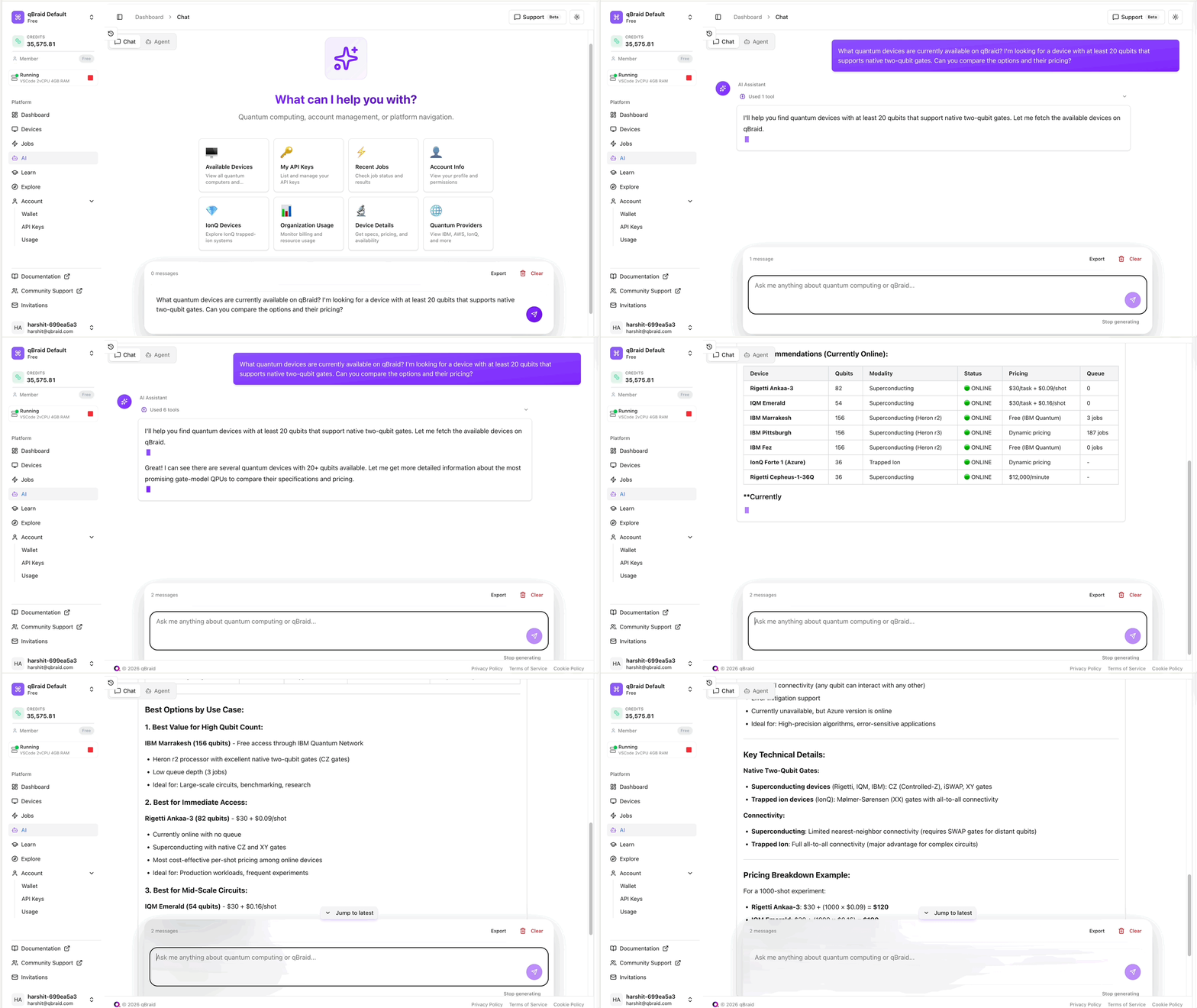
    **Example prompt:**

    ```
    What quantum devices are currently available on qBraid?
    I'm looking for a device with at least 20 qubits that supports
    native two-qubit gates. Can you compare the options and their pricing?
    ```

    The AI will provide:

    * List of matching devices with specifications
    * Current online/offline status
    * Queue depths and estimated wait times
    * Pricing in qBraid credits
    * Recommendations based on your requirements

    <div style={{ display: "flex", justifyContent: "center", alignItems: "center" }}>
      <img src="https://storage.googleapis.com/qbraid-static-assets/qbraid-docs/ai/devices.gif" alt="Device Query Example" width="100%" />
    </div>
  </Tab>

  <Tab title="Quantum Jobs">
    ### Managing Quantum Jobs

    Get insights into your quantum job history, check statuses, and retrieve results.

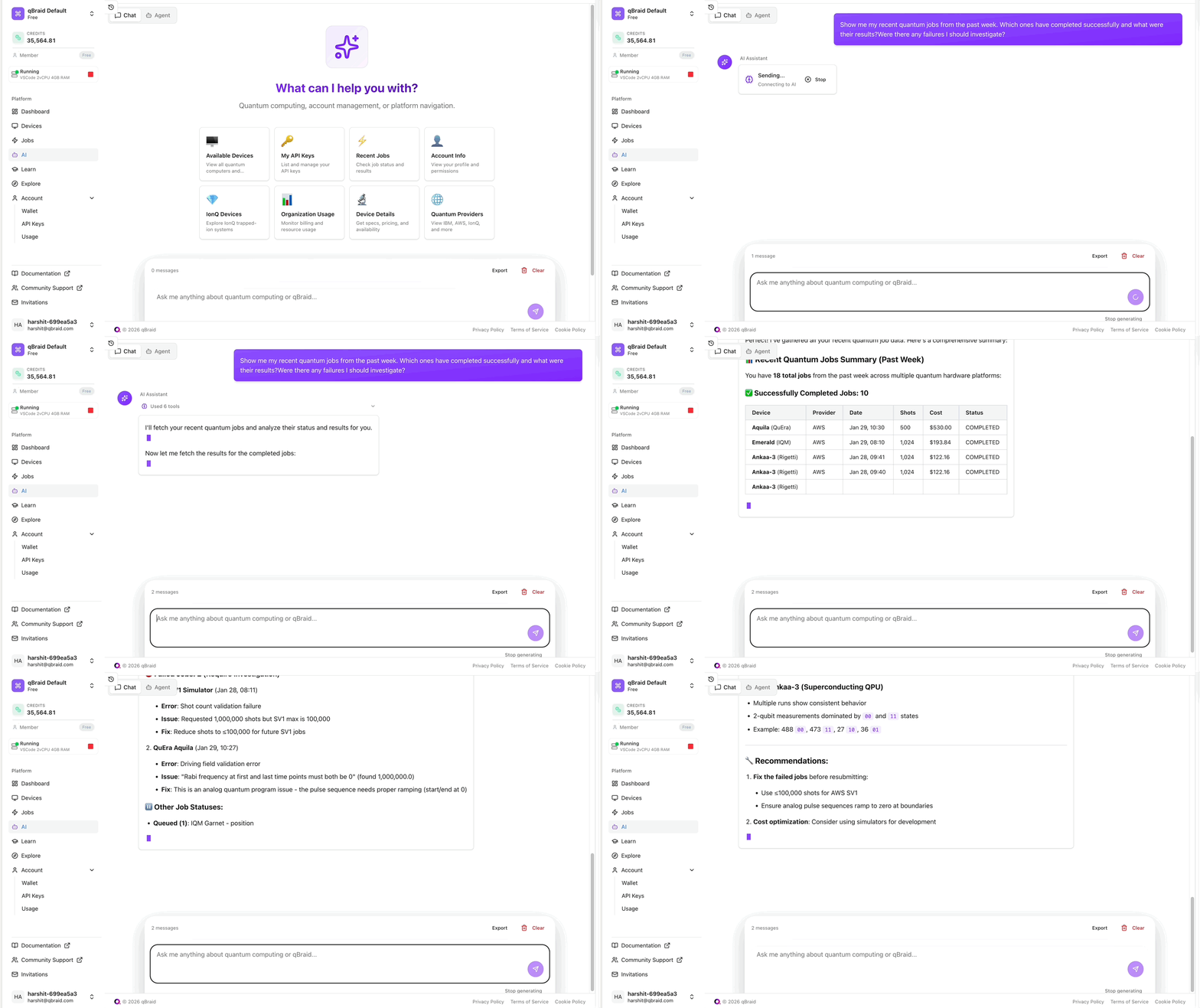
    **Example prompt:**

    ```
    Show me my recent quantum jobs from the past week.
    Which ones have completed successfully and what were their results?
    Were there any failures I should investigate?
    ```

    The AI will provide:

    * Summary of your recent jobs
    * Status breakdown (completed, failed, running, queued)
    * Results and measurement counts for completed jobs
    * Error analysis for failed jobs
    * Cost breakdown in credits

    <div style={{ display: "flex", justifyContent: "center", alignItems: "center" }}>
      <img src="https://storage.googleapis.com/qbraid-static-assets/qbraid-docs/ai/jobs.gif" alt="Jobs Query Example" width="100%" />
    </div>
  </Tab>

  <Tab title="Learning Pathway">
    ### Personalized Learning

    Get customized recommendations for learning quantum computing based on your background and goals.

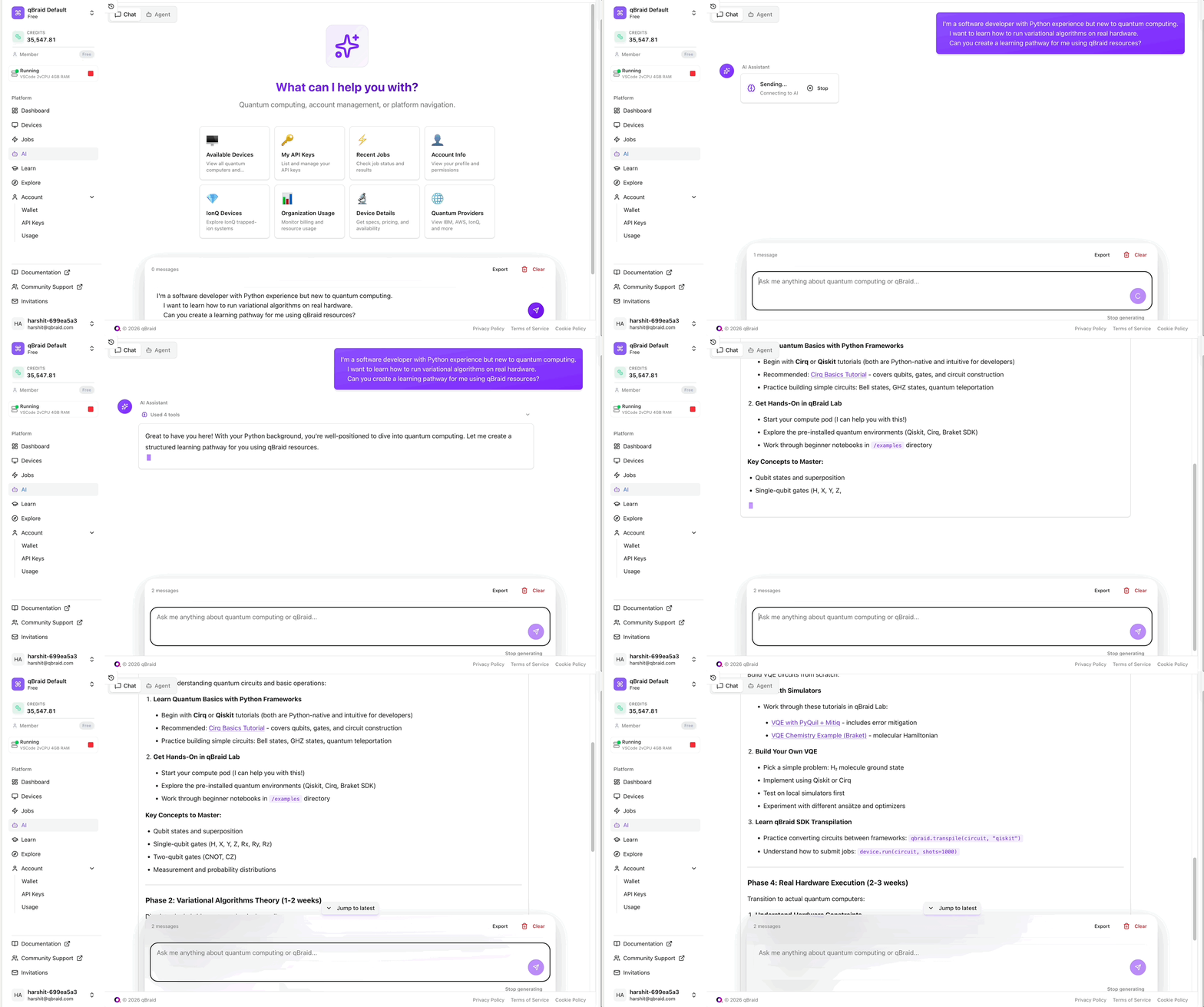
    **Example prompt:**

    ```
    I'm a software developer with Python experience but new to quantum computing.
    I want to learn how to run variational algorithms on real hardware.
    Can you create a learning pathway for me using qBraid resources?
    ```

    The AI will provide:

    * Structured learning path tailored to your experience
    * Recommended qBraid tutorials and notebooks
    * Suggested environments to install
    * Hands-on exercises with increasing complexity
    * Resources for specific topics (VQE, QAOA, etc.)

    <div style={{ display: "flex", justifyContent: "center", alignItems: "center" }}>
      <img src="https://storage.googleapis.com/qbraid-static-assets/qbraid-docs/ai/learning-path.gif" alt="Learning Pathway Example" width="100%" />
    </div>
  </Tab>
</Tabs>

## Tips for Effective Prompts

<AccordionGroup>
  <Accordion title="Be Specific">
    Instead of "Tell me about devices," try "What's the qubit count and connectivity of the IonQ Aria device?"
  </Accordion>

  {" "}

  <Accordion title="Provide Context">
    Mention your experience level, the quantum framework you're using (Qiskit,
    Cirq, etc.), and your end goal.
  </Accordion>

  {" "}

  <Accordion title="Ask Follow-ups">
    The AI maintains conversation context, so you can ask clarifying questions or
    dive deeper into any topic.
  </Accordion>

  <Accordion title="Request Code Examples">
    Ask for code snippets in your preferred framework — the AI can generate working examples for qBraid Lab.
  </Accordion>
</AccordionGroup>

## What's Next

Ready to go beyond chat? Learn how [Agent Mode](/v2/ai/user-guide/agent-mode) enables you to execute complete quantum workflows directly from natural language commands.