> ## Documentation Index
> Fetch the complete documentation index at: https://docs.qbraid.com/llms.txt
> Use this file to discover all available pages before exploring further.
> ## Agent Instructions
> Prefer the qBraid CLI for programmatic platform actions: pip install 'qbraid-cli>=0.12', then run `qbraid configure` once with an API key from https://account.qbraid.com/account/api-keys.
> When writing Python, prefer the qBraid SDK: `from qbraid.runtime import QbraidProvider` wraps devices, job submission (`device.run()`), and batch groups (`GroupJobSession`).
> Always install the latest packages (pip install -U qbraid qbraid-cli); do not pin versions from memory. qbraid-cli below 0.12.0 is incompatible with the current API.
> Device IDs use the QRN format vendor:provider:type:name (e.g. qbraid:qbraid:sim:qir-sv, rigetti:rigetti:qpu:cepheus-1-108q). Legacy underscore IDs are deprecated.
> The REST API base URL is https://api-v2.qbraid.com/api/v1, authenticated with an X-API-Key header.
> For endpoints without a dedicated wrapper, use `QbraidSessionV1` from `qbraid_core` — an authenticated session (`.get()`/`.post()`) that sets the X-API-Key header. Full spec: https://docs.qbraid.com/openapi-v2.json
> Free simulators cost no credits; QPU and GPU jobs consume credits. Surface the estimated cost to the user before submitting a paid job.
> For account signup, API keys, credits, and end-to-end action recipes, see https://qbraid.com/llms.txt.
# Circuit Composer
> Build circuits visually, edit QASM, inspect probabilities, and run on quantum devices.
## Build a circuit
1. Open [Circuit Composer](https://account.qbraid.com/composer).
2. Select **Load example circuit** and choose **Bell State**, or drag gates from the palette onto the circuit.
3. Use the toolbar to add or remove qubits and classical bits.
4. Edit gate parameters when the gate requires them.
5. Inspect the QASM editor and the **Probabilities** panel as you change the circuit.
The visual circuit and QASM editor stay in sync for supported circuits. Resolve parsing errors before using the circuit. Use **Undo** or **Redo** to revise an edit. **Clear circuit** asks for confirmation before it resets the circuit.
For circuits with conditional gates, the probability panel warns that its simulation shows unconditional results only.
The toolbar shows the circuit's gate count and depth. The probability preview is a simulator result, separate from a submitted hardware job.
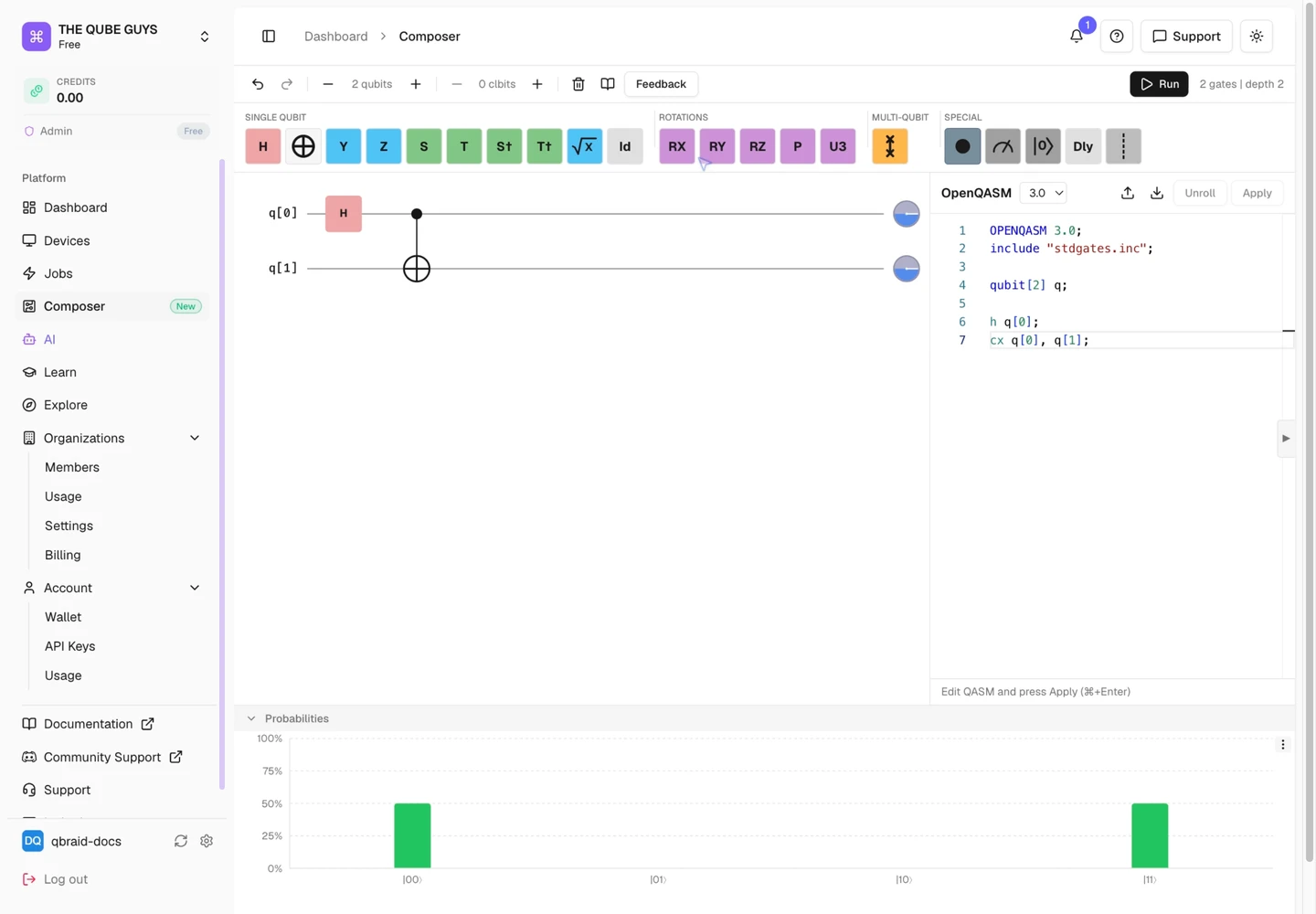 The Bell State example shows the circuit, QASM, and simulated probabilities together.
## Run on a device
1. Select **Run**.
2. Optionally enter a job name.
3. Set the number of **Shots**.
4. Search for a device and review its provider, qubit count, type, and status.
5. Review the displayed cost estimate or usage-based pricing notice.
6. Select **Run on** for the chosen device.
7. After submission, select **View in Quantum Jobs** to follow the job.
The Bell State example shows the circuit, QASM, and simulated probabilities together.
## Run on a device
1. Select **Run**.
2. Optionally enter a job name.
3. Set the number of **Shots**.
4. Search for a device and review its provider, qubit count, type, and status.
5. Review the displayed cost estimate or usage-based pricing notice.
6. Select **Run on** for the chosen device.
7. After submission, select **View in Quantum Jobs** to follow the job.
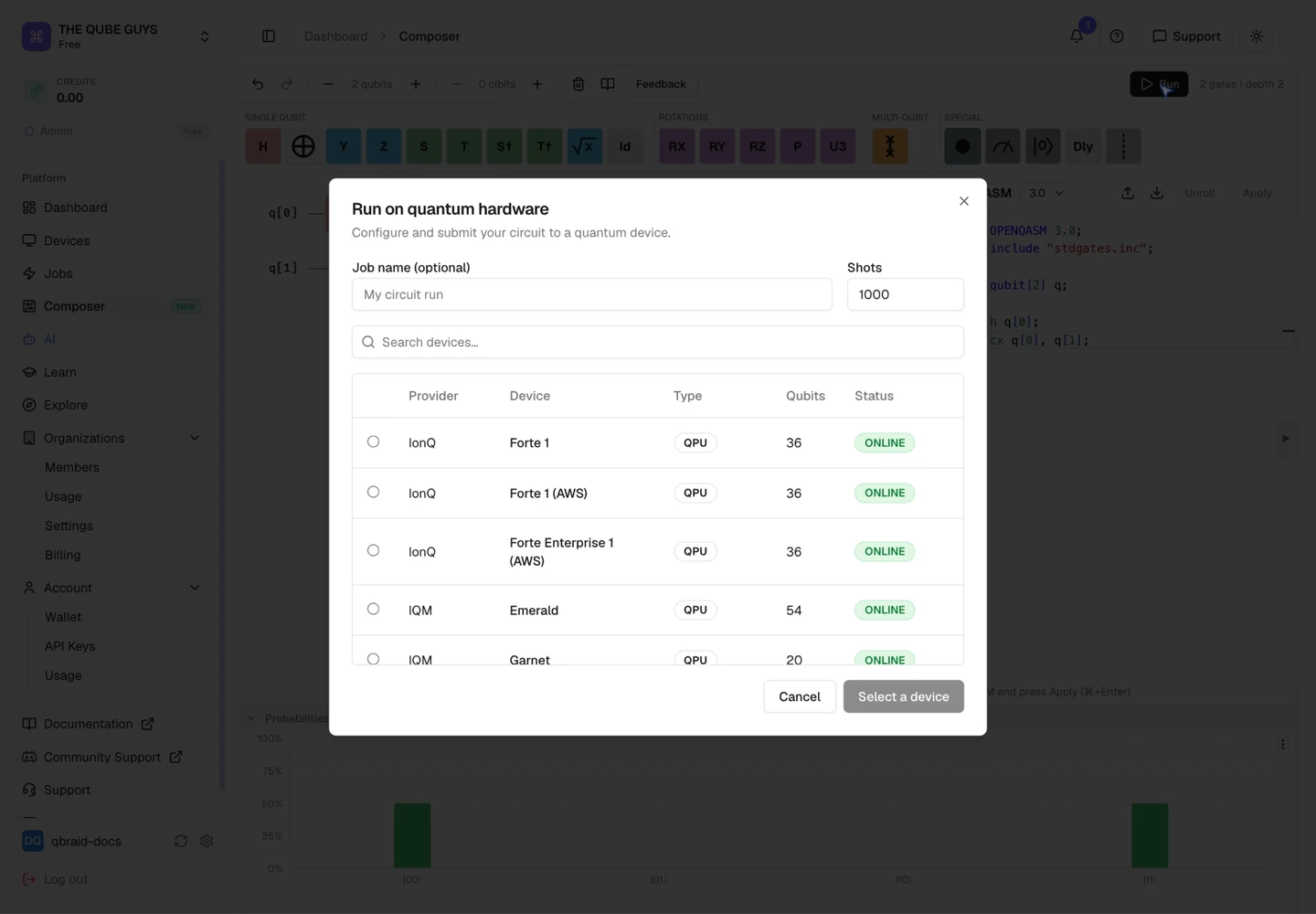 Review shots and device availability before selecting a device and submitting a job.
The device picker lists QASM-compatible devices and disables selections the circuit cannot use. A device may be unavailable because it has too few qubits or does not accept submissions in its current state.
Open Quantum devices require a linked account. Use **Connect your account** in
the run dialog and follow the [Open Quantum setup
guide](https://docs.qbraid.com/v2/account/integrations/openquantum).
For devices with usage-based pricing, the final cost is calculated after the job runs. A probability preview does not submit a hardware job or guarantee its result.
Use the Composer **Feedback** button to open a support request with the Circuit Composer subject prefilled.
## Watch the Composer flow
2× speed; stops before submitting a job.
Review shots and device availability before selecting a device and submitting a job.
The device picker lists QASM-compatible devices and disables selections the circuit cannot use. A device may be unavailable because it has too few qubits or does not accept submissions in its current state.
Open Quantum devices require a linked account. Use **Connect your account** in
the run dialog and follow the [Open Quantum setup
guide](https://docs.qbraid.com/v2/account/integrations/openquantum).
For devices with usage-based pricing, the final cost is calculated after the job runs. A probability preview does not submit a hardware job or guarantee its result.
Use the Composer **Feedback** button to open a support request with the Circuit Composer subject prefilled.
## Watch the Composer flow
2× speed; stops before submitting a job.